A family should earn its place in the model.
Families / Cutsheet / Revit 2025
Generic Models
Free limited-scope sample: choose category, protect insertion and prove a simple family's behavior.
Category diagram
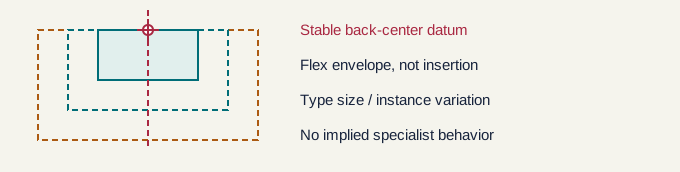
Free online sample / A stable insertion contract
A useful, limited-scope excerpt of the cutsheet. No registration or purchase is required to read it.
01 / Category and host
Use Generic Models only when no more accurate supported category fits. Choose level, face or work-plane placement deliberately; category changes do not recreate host behavior. This free sample covers a simple non-adaptive model family, not specialist MEP, structural or system-family functionality.
02 / Datum and insertion
For a synthetic block, choose back-center at base as insertion. Establish named left/right/front planes, dimension to them and constrain geometry to the framework. Flex width/depth/height before adding detail; the insertion intersection must not move when the envelope changes.
03 / Synthetic acceptance test
Try 300/600/900 mm widths with nonzero depth/height; reject invalid inputs rather than approximate. Place, dimension references, rotate, mirror and switch types. Reload over placed instances and regenerate; inspect tags and optional cuts. Record warnings. Sample limitations: no host validation, certification or project-specific design review.
This online excerpt is not a family file or proof of host behavior.
Technical source notes
Official Autodesk Help is cited for product behavior. The authoring and QA recommendations and diagrams are original. Verify the actual template, discipline and project requirements.